
Generating a site with AI
Describe your business and get a complete, editable multi-page site in a few minutes.
First connect your AI key. Then, on the Sites page, find Generate with AI on the right:
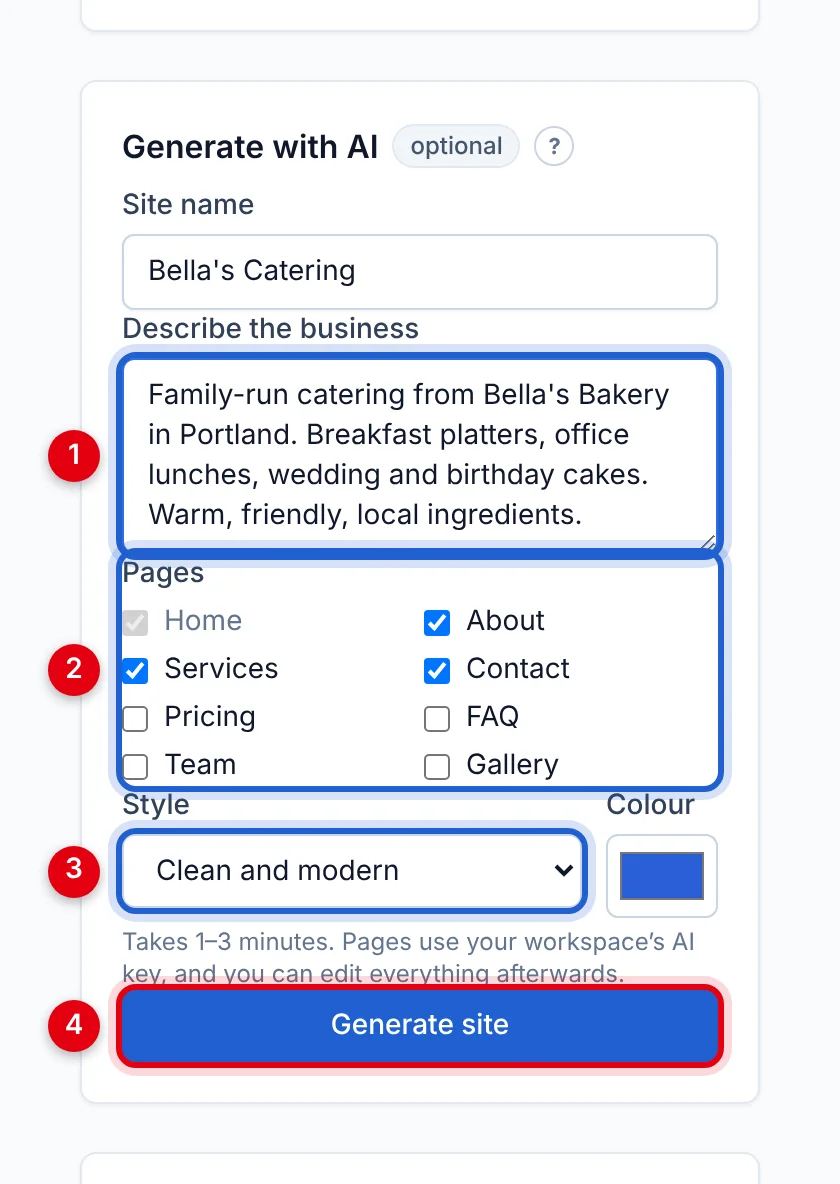
- Describe the business — a few sentences: what you do, where, for whom, what makes you different. (Fill in the Site name above it too.)
- Pages — Home is always included; tick the others you want.
- Style and Colour — the overall feel and main colour.
- Click Generate site.
It takes 1–3 minutes. Then the new site is ready to edit like any other — its contact page's form is already connected.
Tips for a better result
- Mention your location, services, prices, opening hours and tone of voice.
- Check every fact before publishing — AI can invent details.
- Replace the placeholder photos with your own. See Images and media.
Updated Oct 12, 2026, 7:47 PM
Didn’t find what you need? Contact support.