
Using your own domain
Connect a domain like www.yourbusiness.com to your site, with automatic HTTPS.
Custom domains are available on paid plans. You'll need a domain name from a registrar such as GoDaddy, Namecheap, Cloudflare or Squarespace Domains.
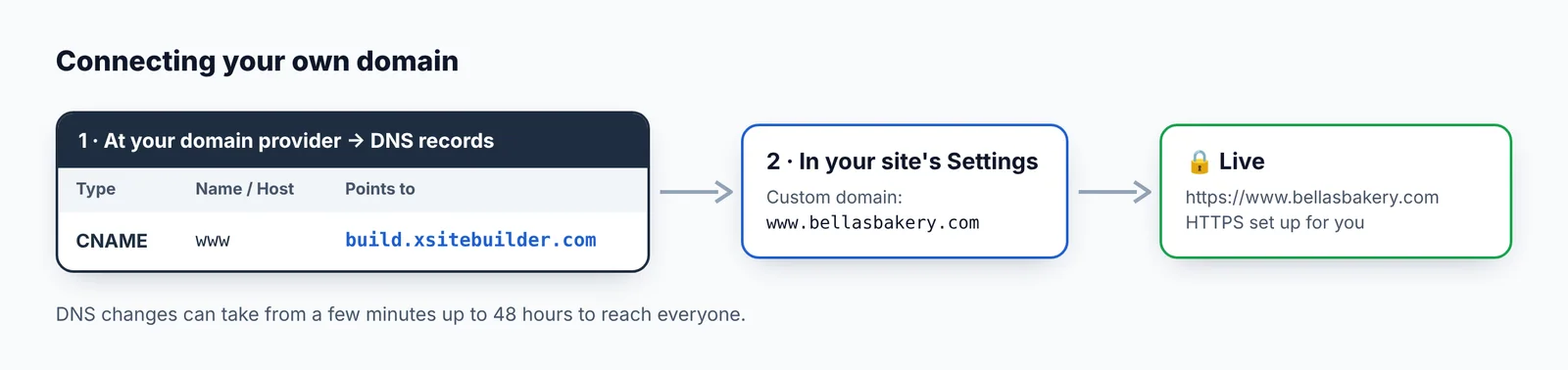
Step 1 — Add a DNS record at your domain provider
Sign in where you bought your domain and find its DNS settings. Add this record:
| Type | Name / Host | Value / Points to |
|---|---|---|
| CNAME | www |
build.xsitebuilder.com |
If there's already a www record, edit it instead of adding another.
Step 2 — Enter the domain in XSiteBuilder
- Go to the site's page (Manage) → Settings.
- Type your domain in Custom domain, e.g.
www.yourbusiness.com. - Click Save settings.

That's it. The first time someone visits, a free security certificate (HTTPS) is set up automatically — the very first visit can take a few extra seconds.
Good to know
- DNS changes can take anywhere from a few minutes to 48 hours to reach everyone.
- Most providers don't allow a CNAME on the bare domain (
yourbusiness.comwithoutwww). Use your provider's redirect or forwarding feature to send the bare domain tohttps://www.yourbusiness.com. - Your free address keeps working too.
- Make sure the site is published.
Still not working? Check the record with a free tool such as dnschecker.org — the www name should point to build.xsitebuilder.com.
Updated Oct 12, 2026, 7:47 PM
Didn’t find what you need? Contact support.